Company Logo
Phone Hours: Mon-Thu: 6:30am-5pm PDT, Fri: 6:30am-4pm, Sat, Sun: CLOSED
Pickup Hours: 3pm-4pm only.
Grapple Products


Call us toll free at:  1.800.634.4874

  0 Items @ $0.00  
SEARCH:

View our Catalog online.
Advertisements.
    Current Sale Ads.
    Exclusive Offers and Savings
      Get on our email list!

      Get specials via Text!


      Help

      Frequently Asked Questions
       
      What is a default shipping address?
      What is a default credit card?
      When will my order get to me?
      Can I have more than one Billing address?
      Can I have more than one shipping address?
      How can I add a shipping address to my address list?
      Can I delete an address from my address list?
      How do I make changes to an address in my list?
      How do I check the status of my order?
      How do I cancel an order?
      As a registered customer, what are my other benefits?
      I already have an account with you. Do I need to register myself
      again on your web store?
      Can I place an order without registering my account?
      How can I place an order without using my credit card?
      What should I do if I forget my password?
      What is your return policy?
      What about my privacy?
      How do I view a Friend's Wish List?
      How do I access Wish List?
      How do I create a Wish List?
      How to allow other users to access your Wish List ?
      How to allow invitees to ship to other Addresses ?
      How to hide purchase from Invitees ?
      What is Current Wish List ?
      Do you offer International Shipping?
        Learn about our on-line shop
        Pricing And Discount
        Payment Options
        Tracking Your Order
        Wish List

      What is a default shipping address?
      You may have specified more than one shipping address in your account information. The default shipping address is the address to which your order will be shipped unless you select another shipping address for this order.

      What is a default credit card?
      You may have specified more than one credit card in your account information. The default credit card is the card that will be charged with the value of your order unless you select another credit card to be charged for this order.

      When will my order get to me?

      Shipping

      Time in Transit Information
      All orders are charged and shipped within 48 hours, if we have your items in stock. Items that are being shipped from the manufacturer, may take longer.

      To help you better determine what shipping method you need, please follow the following guidelines. These times are not concrete, they are an approximation by Time Zone.

      Standard Ground Shipping

      Zone: Days to Deliver on Average
      Pacific Standard Time 2-4 business days
      Mountain Time 3-5 business days
      Central Time 4-6 business days
      Eastern Time 5-7 business days

      Express Shipping Options (Continental U.S. only)
      For an additional fee, your package can be upgraded to 3-Day, 2-Day or Next Day. 

      We will do our best to ship packages the same day they are ordered, however we cannot guarantee it. Please consider this when deciding how your package will be shipped.

      The graph below is a representation of time in transit for express services.

      Shipping Upgrade Options

      Upgrade Saturday Sunday Monday Tuesday Wednesday Thursday Friday
        No Delivery No Delivery          
      3-Day Place Order Online   Order Processed Order Shipped 1st Day 2nd Day Delivery Day
      2-Day Place Order Online   Order Processed Order Shipped 1st Day Delivery Day  
      Next Day Place Order Online   Order Processed Order Shipped Delivery Day    

      ** Our business does not process orders over the weekend.  Likewise, UPS does not deliver packages on weekends.

      Can I have more than one billing address?
      No. You cannot have more than one billing address. But you can change your billing address by editing it.

      Can I have more than one shipping address?
      Yes. You can specify as many shipping addresses as you want.

      If you live in the USA, the sales tax levied on a customer depends on the tax jurisdiction he comes under. For instance, if you purchase items for use in the State of California, USA, you would be charged California Sales Tax. If you live outside the USA, the taxes you pay depend on the country you live in. The tax zones are the various jurisdictions under which you could fall.

      How can I add a shipping address to my address list?
      To add a shipping address, click on Account Info. The details of your account are displayed. Click on the Add New Shipping Address button to add a new shipping address.

      Can I delete an address from my address list?
      No. You cannot delete any address but you could change it by editing it.

      How do I make changes to an address in my list?
      To edit an address, click on Account Info. The details of your account are displayed. Click on the Edit button below the address that has to be changed.

       
      Top of page

      How do I check the status of my order?
      To check the status of an order, click on the Order Status link. If you know your order number and the type of transaction (orders, quotations or return orders), enter it and click on the Submit button. To view multiple orders, enter the purchase order number if provided by you or select the display type from the drop-down list and specify the desired period. All the orders you have placed with us (both through the web and through other means) are listed. Click on the order number whose status you want to check. The order details are displayed along with the tracking numbers for the shipments made.

      How do I cancel an order?
      To cancel an order, you must contact our customer service executive either by mail or through telephone and they will give you further information.

      What are the benefits of registration?
      As a registered customer, you become entitled to special discount schemes and promotional pricing offers. These schemes would become available to you not only on orders you place at our web store but also to orders through other channels.

      I already have an account with you. Do I need to register myself again on your web store?
      No. If you already have an account with us, contact our Customer Service; they will give you your login name and password. You can login and then change your password.

      Can I place an order without registering my account?
      Before you place an order with us, you must register with us. We understand how valuable your time is and our registration has been designed to take up not more than a few minutes of your time. Once you have registered with us, you need not give your address and credit card details on future visits to our shop. This will save you the trouble of entering this information on every purchase you make from us.

      How can I place an order without using my credit card?
      There are other payment options available at the Online Shop using which you can place an order. Select the option most suitable to you in the "Payment Method" area while creating an order. For example if you wish to pay by Check, select this option to create the order. You may send your check to our address by quoting your order number. If you need any further assistance, please contact our Customer Service Department.

      What should I do if I forget my password?
      If you are a registered user and have forgotten your password, go to the Login page and simply type in your Login Name or your default E-mail address under "I am a registered user but forgot my password" and click on submit. We will send your password to your default E-mail address.

      What is your return policy?
      The wearable wrestling equipment that you have purchased from Suplay Products has a 30 day warranty against defects. Any product that appears to be defective must be returned within 30 days with receipt showing date of purchase..

      Returns may be made in person or by mail. For those making a return by mail, please follow these steps and conditions:

    • Contact SUPLAY for a return authorization number.
    • Place this number on both the inside and the outside of your return package for identification.
    • You must prepay the freight.

    • If the merchandise is defective, we reserve the right to repair, replace or adjust in accordance with industry standards. Any merchandise returned must be cleaned prior to returning. We do not repair defective merchandise after a 30 day warranty has expired. If unused merchandise is returned for exchange of size, style, or color due to our error in shipping, no charge will be made; if customer has made an error when ordering, they will be responsible for shipping charges both ways. Unwanted and unused merchandise returned for credit will be subject to a 20% restocking fee. No returns accepted for credit on used merchandise. Customer must decide satisfaction with size, fit, and style before using.

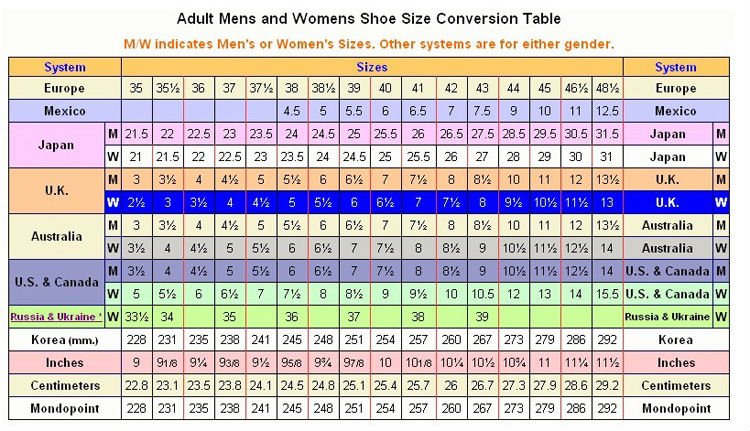
      VERY IMPORTANT: Wrestling shoes are designed to be worn on the wrestling mat only...not on the gym floor, locker room, or outside. We WILL NOT replace, exchange, or repair shoes that have been worn off the mat for any reason. Wrestling shoes are designed to be very light weight and flexible. They will not hold up under wear off the wrestling mat. All warranties are void immediately upon wearing the shoe off the mat. DO NOT WASH SHOES OTHER THAN WITH A DAMP CLOTH.

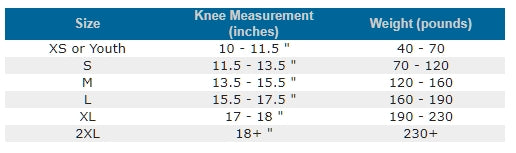
      No customized singlets or warm-ups may be returned for any reason other than on error in printing or a defect as listed above. Lycra singlets will stretch with wearing. They should fit "snugly" at first. DO NOT IRON SINGLETS.


      What is your privacy policy?


      Your privacy is important to Suplay.  This privacy statement provides information about the personal information that Suplay collects, and the ways in which Suplay uses that personal information.


      Personal information collection


      Suplay may collect and use the following kinds of personal information:


      l  information about your use of this website

      l  information that you provide using for the purpose of registering with the website

      l  information about transactions carried out over this website.  

      l  information that you provide for the purpose of subscribing to the website services and

      l  any other information that you send to Suplay.


      Using personal information


      Suplay may use your personal information to:


      l  administer this website;

      l  personalize the website for you;

      l  enable your access to and use of the website services;

      l  publish information about you on the website;

      l  send to you products that you purchase;

      l  supply to you services that you purchase;

      l  send you statements and invoices;

      l  collect payments from you; and

      l  send you marketing communications.


      Where Suplay discloses your personal information to its agents or sub-contractors for these purposes, the agent or sub-contractor in question will be obligated to use that personal information in accordance with the terms of this privacy statement.


      In addition to the disclosures reasonably necessary for the purposes identified elsewhere above, Suplay may disclose your personal information to the extent that it is required to do so by law, in connection with any legal proceedings or prospective legal proceedings, and in order to establish, exercise or defend its legal rights.


      Securing your data


      Suplay will take reasonable technical and organisational precautions to prevent the loss, misuse or alteration of your personal information.


      Suplay will store all the personal information you provide on its secure servers.


      Information relating to electronic transactions entered into via this website will be protected by encryption technology.


      Cross-border data transfers


      Information that Suplay collects may be stored and processed in and transferred between any of the countries in which Suplay operates to enable the use of the information in accordance with this privacy policy.


      In addition, personal information that you submit for publication on the website will be published on the internet and may be available around the world. (ie. Blogs, comments, etc..)


      You agree to such cross-border transfers of personal information.


      Updating this statement


      Suplay may update this privacy policy by posting a new version on this website. 


      You should check this page occasionally to ensure you are familiar with any changes. 


      Other websites


      This website contains links to other websites. 


      Suplay is not responsible for the privacy policies or practices of any third party.


      Contact Suplay


      If you have any questions about this privacy policy or Suplay’s treatment of your personal information, please use the contact us link at the top of the page.


      International Shipping Now Available!

      We have partnered with Bongo International to service our customers Worldwide!

      Bongo International provides our customers with their very own US address. Once you have a US address, you will be able to make purchases with us as well as other US based online retailers. Bongo receives your purchases and logs them into their online system which you can use to view your items and consolidate them with multiple orders.

      International customers can save up to 82% off typical international shipping rates by following these four easy steps:

      Register with Bongo and receive a U.S. shipping address.
      Enter the Bongo address as both your billing and shipping address.
      Use the credit card that you have on file with Bongo as the payment method.
      Once the order arrives at Bongo, log into your account to forward to your country.

      If you have any questions, please feel free to contact Bongo through live chat or by e-mail. They will be glad to assist you.

      Click Below to Get Started:

       
      Top of page

      Wish List

      How do I view a Friend's Wish List?
      Enter the First name or Last Name or Event Name or eMail address or period of event date of your friend or family member in the search box to find their Wish List. You will see the search results of the Wish List search.

      How do I access Wish List?
      If access code is provided for the Wish List, then it leads to Invitee Validation Page, else it shows the items within the Wish List. Enter the email address and access code to see the items in the Wish List. After validating the email and access code, items in that Wish List are displayed.

      How do I create a Wish List?
      Click on the Wish List link. To create a Wish List you must be a registered user. If you already have an account, then login to the store. After Logging in, you can create a new Wish List by filling the required details and can make it your Current Wish List by selecting the option provided on the page. When you find a product that you want to add to your Wish List, click on the "Add to Wish List" link. All the items added will be added to the Current Wish List.

      How to allow other users to access your Wish List ?
      While you create Wish List, you have the option to make your created Wish List accessible by other users or not. If you want your Wish List to be accessible by any user, select option "Allow any User to access Wish List" else leave it unchecked. If your Wish List is not accessible to all, you can set access code to make it accessible to your invitees. The invitees can use the access code set by you to access your Wish List.

      How to allow invitees to ship to other Addresses ?
      When you create your Wish List, simply check the option "Allow invitees to ship to other addresses". This will allow the invitees to add a new shipping address while creating their orders and also ship the purchased items to that address.

      How to hide purchase from Invitees ?
      To hide the quantity of items in your Wish List that has already been purchased select the option "Hide purchase from invitees". The Invitee will only be able to view the items and its price in your Wish List, once the invitee accesses it through the access code provided by you.

      What is Current Wish List ?
      Current Wish List is the default Wish List created by you. Any items that you wish to add to the Wish List will be added to this current Wish List by default. If you want to choose any other Wish List as your Current Wish List, click on the Wish List link in the right hand side menu to get a list of all your Wish Lists. Here check the appropriate radio button and click on "Make Current" button to make the selection your Current Wish List.

       
      Top of page

      Pricing And Discount
      The price for each and every item on our online store has been carefully decided to make sure that you get the best deal in town. We also offer huge discounts on almost all the listed items for both guest users and registered customers. Of course, to get a better discounted price you must be a registered customer.

      Payment Options
      There are various payment options available at the Online Shop such as Credit Card, Check etc. using which you can place an order. Select the option most suitable to you in the "Payment Method" area while creating an order. For example if you wish to pay by Check, select this option to create the order. You can send us the payment to our address. Please make sure to quote the correct order number when sending your payment. If you need any further assistance, please contact our Customer Service Department.

      Tracking your order
      Click on the Order Status link provided in the Services menu. If you know your order number and the type of transaction (orders, quotations or return orders), enter it and click on the Submit button. To view multiple orders, enter the purchase order number if provided by you or select the display type from the drop-down list and specify the desired period. All the orders you have placed with us (both through the web and through other means) are listed. Click on the order number whose status you want to check. The order details are displayed along with the tracking numbers for the shipments made. To track the shipment, you must go to the web site of the shipping carrier.

       
      Top of page


      /HELP.ASP